Swati Mishra

Updated 2 years ago

Install Google with ease

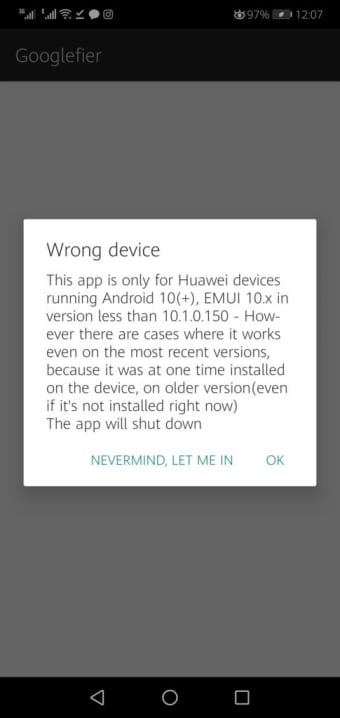
Googlefier is a free mobile utility software that enables you to install Google services on your Huawei or Honor phone. Developed by bender_007, this handy tool is a Google Mobile Services installer and works on certain China brands of mobile devices, as these do not offer Google services on their apps and use their own version. Take note that this app requires specific operating systems and phone models.

For Chinese phones

Google Mobile Services (GMS) is a collection of Google applications and APIs that help support functionality across devices. These apps work together seamlessly to ensure that your device provides a great user experience right out of the box. These usually come pre-installed on Android devices but manufacturers need to obtain a license from Google in order to legally pre-install them. Unfortunately, some China mobile brands don’t include this service on their products.

The aforementioned brands include Huawei and Honor and they have their own GMS-like feature, such as Huawei Mobile Services. However, if you want Google’s more, then using Googlefier is your best chance. This is pretty easy to use but take note that since it’s not officially supported by Google, there’s a chance that you can get unsafe apps. You will have to allow installing APKs from “Unknown Sources” in your device settings. 

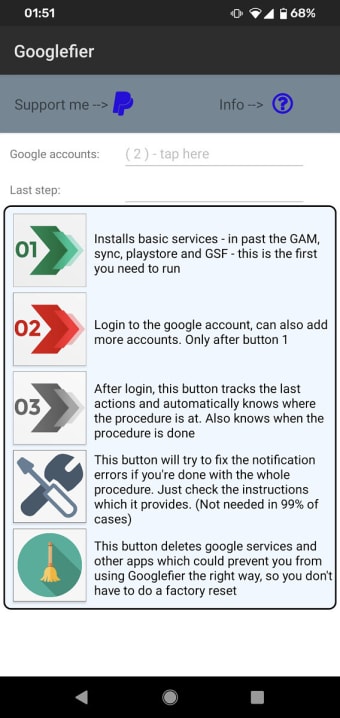
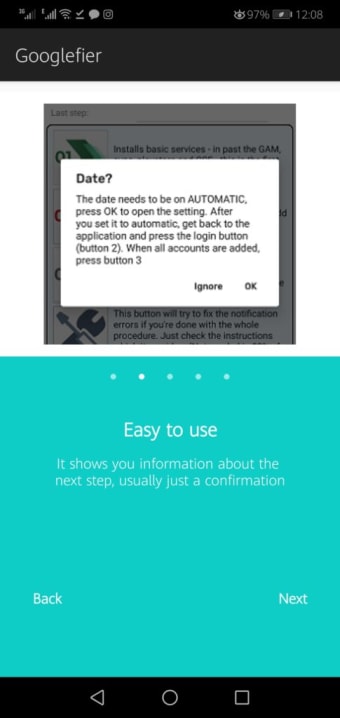
First, download the app and install it. Take note that devices made after April 2020 aren’t recommended for this. Allow all necessary permissions and then follow the instructions to get the installation going. The app will replace your existing backup app and restore LZPlay, which is another GMS installer. Afterward, the basic services will be available and you’ll be able to install Google Play Store and other Google apps by logging into your Google account.

Hassle-free

All in all, Googlefier is a great choice if you want to get Google’s handy apps for your device. While it’s not compatible with all Huawei and Honor models, it’s still a convenient mobile app—especially for users who don’t want to root their phone. Just remember that this tool also requires your device to at least have Android 10 as an OS.


Swati Mishra

Swati has over a decade of experience in content strategy, SEO, and editorial writing across technology and travel. She specializes in technical reviews, structured guidelines, and long-form pieces. Her work focuses on clear organization, search intent, and practical takeaways for readers evaluating software and digital tools.

  • Pros

    • Doesn’t need root permissions
    • Can install Google services on non-Google-supported devices
    • Easy installation
    • Allows you to add more than one account
  • Cons

    • Not all phone models are supported
    • Needs at least Android 10 to work
 0/3

App specs

  • License

    Free

  • Version

    1.0

  • Latest update

  • Platform

    Android

  • OS

    Android 5.0

  • Language

    English

  • Downloads

    344.9K

    Last month's downloads

    • 1K
  • Size

    161.60 MB

  • Developer

  • Download Options

    APK, Google Play

  • Filename

    googlefier_eng.apk

Program available in other languages


User reviews about Googlefier

Have you tried Googlefier? Be the first to leave your opinion!

You may also like

Alternatives to Googlefier

Explore Apps

Latest articles

Laws concerning the use of this software vary from country to country. We do not encourage or condone the use of this program if it is in violation of these laws.
Softonic
Your review for Googlefier
Softonic

Is Googlefier safe?

85/100

Score result: Warning

This file has been flagged as potentially harmful or containing unwanted bundled software. Please proceed with caution.

  • Virus free
  • Spyware free
  • Malware free
  • Verified by Security Partners

    VirusTotal logo

Scan Info

Last scan
Sunday, November 12, 2023
Scan provider
VirusTotal · Full report

File Integrity

File
googlefier_eng.apk
SHA256
fe5f4ae67a329ca741328fd2a48d17ded5e099d20cd1607ab3b09bebda1b9031
SHA1
13531b35c088ff56b9f480313568fb1178397ea8

Softonic security notice

This software has been thoroughly scanned by our advanced security systems and verified by industry-leading partners. However, one or more antivirus engines have flagged this software with potential risks. While these detections may be false positives, we recommend caution when downloading and installing. Some programs may include unwanted software or behaviors that could affect your device. False positives can occur when safe software is mistakenly flagged as harmful due to overly cautious detection rules or algorithms in antivirus tools. This means the program may still be safe to use, but we advise reviewing the details before proceeding.